Time Blocking: Structure Your Day for Maximum Productivity
Structure your day with time blocks to get more done with less stress

Time blocking is a revolutionary approach to time management that transforms your calendar from a simple appointment tracker into a powerful productivity system. Instead of working from endless to-do lists and reacting to whatever demands your attention, time blocking involves deliberately scheduling specific blocks of time for different activities, projects, and priorities. This method helps you take control of your schedule, maintain focus, reduce stress, and ensure that your most important work gets the attention it deserves.
Key Takeaways
- Blocks turn intentions into appointments. Scheduled work is far likelier to happen than a task list.
- Leave buffer time. Back-to-back blocks collapse the moment anything overruns.
- Group similar work together. Batching reduces the cost of switching context.
- Adjust the system to your work style. Rigid blocking suits some roles; looser themed days suit others.
Understanding Time Blocking
Time blocking is the practice of dividing your day into dedicated time periods, each assigned to specific tasks, projects, or types of work. Unlike traditional scheduling where you only block time for meetings and appointments, time blocking assigns every hour of your day to a particular purpose, including:
- Deep work sessions: Focused time for important projects
- Administrative tasks: Email, paperwork, routine responsibilities
- Creative work: Brainstorming, writing, design, problem-solving
- Personal activities: Exercise, meals, family time, self-care
- Buffer time: Transition periods and unexpected tasks
- Communication blocks: Calls, meetings, collaboration time
The Science Behind Time Blocking
Cognitive Benefits
Time blocking can be useful because it turns a long list of intentions into visible periods for specific work. It is a planning method, not a guarantee of higher output, and it works best when blocks are adjusted to match real interruptions and energy levels.
- Reduced decision fatigue: Pre-planned schedules eliminate constant micro-decisions
- Enhanced focus: Dedicated time blocks minimize context switching
- Improved memory: Structured time helps with task prioritization and recall
- Flow state activation: Extended blocks allow for deep engagement
- Stress reduction: Clear boundaries reduce anxiety about unfinished tasks
Productivity Psychology
- Parkinson's Law: Work expands to fill available time—blocks create natural constraints
- Time awareness: Blocking makes you conscious of how you actually spend time
- Intention setting: Planned activities are more likely to align with goals
- Progress tracking: Completed blocks provide tangible sense of accomplishment
- Boundary creation: Prevents work from bleeding into personal time
Types of Time Blocking
Task-Based Blocking
Schedule specific tasks or projects:
- 9:00-10:30 AM: Write quarterly report
- 10:30-11:00 AM: Review and respond to emails
- 11:00 AM-12:00 PM: Client presentation preparation
- 2:00-3:00 PM: Team meeting
- 3:00-4:30 PM: Budget analysis
Theme-Based Blocking
Assign themes or types of work to different time periods:
- Morning blocks: Creative and strategic work when energy is highest
- Mid-morning: Communication and collaboration
- Afternoon: Administrative tasks and routine work
- Late afternoon: Planning and organization for next day
- Evening: Personal time, family, and self-care
Energy-Based Blocking
Match tasks to your natural energy rhythms:
- Peak energy times: Most challenging or important work
- Moderate energy: Meetings, collaboration, routine tasks
- Low energy: Administrative work, organizing, planning
- Recovery periods: Breaks, walks, light activities
Getting Started with Time Blocking
Step 1: Assess Your Current Time Usage
Before you can improve your time management, understand how you currently spend your time:
- Track your activities for 3-7 days in 15-30 minute increments
- Note what you're doing, your energy level, and how focused you feel
- Identify patterns in your productivity throughout the day
- Calculate how much time you spend on different types of activities
- Notice when you're most and least productive
Step 2: Identify Your Priorities
Clarify what deserves your time and attention:
- List your most important goals and projects
- Identify high-impact activities that move you toward your objectives
- Distinguish between urgent and important tasks
- Consider both professional and personal priorities
- Estimate how much time each priority realistically requires
Step 3: Choose Your Blocking Method
Select the approach that best fits your work style and commitments:
- Digital calendars: Google Calendar, Outlook, Apple Calendar
- Specialized apps: Clockify, RescueTime, Toggl Plan
- Paper planners: Day planners, bullet journals, custom templates
- Hybrid approach: Digital for work, paper for personal
- Color coding: Different colors for different types of work
Creating Your Time Blocking System
Weekly Planning Ritual
Develop a consistent weekly planning process:
- Review the previous week: What worked well? What could be improved?
- Identify key priorities: What are the most important things to accomplish?
- Block anchor appointments: Add meetings and fixed commitments first
- Schedule deep work: Block time for your most important projects
- Add routine tasks: Email, administrative work, planning time
- Include personal time: Exercise, meals, family, self-care
- Build in buffer time: Allow for unexpected interruptions
Daily Blocking Strategies
Morning Routine Block
- Start each day with a consistent routine
- Include time for reflection, planning, or goal review
- Prepare mentally for the day ahead
- Avoid checking email or social media immediately
Deep Work Blocks
- Schedule 90-120 minute blocks for focused work
- Choose your best energy times for most important tasks
- Eliminate distractions during these periods
- Set specific objectives for each deep work session
Communication Blocks
- Designate specific times for email and messages
- Batch similar communications together
- Set boundaries about when you're available for interruptions
- Use auto-responders to manage expectations
Transition and Buffer Blocks
- Include 10-15 minute buffers between major activities
- Use transition time to reset mentally and physically
- Build in extra time for potentially overrunning tasks
- Create space for unexpected urgent matters
Advanced Time Blocking Techniques
Theme Days
Assign different themes to different days of the week:
- Monday: Strategic planning and goal setting
- Tuesday: Creative projects and deep work
- Wednesday: Meetings and collaboration
- Thursday: Administrative tasks and operations
- Friday: Review, planning, and lighter tasks
Time Boxing
Set strict time limits for tasks to improve efficiency:
- Assign specific durations to tasks before starting
- Use a timer to maintain awareness of time limits
- Stop when time is up, even if the task isn't perfect
- Review and adjust time estimates based on actual performance
- Gradually reduce time boxes to increase efficiency
Energy Management Integration
Align your blocks with your natural energy cycles:
- Identify your chronotype: Are you naturally a morning or evening person?
- Track energy patterns: Note when you feel most alert and focused
- Match tasks to energy: Do difficult work when energy is high
- Plan recovery time: Include breaks and lower-intensity periods
- Respect your rhythms: Don't fight your natural patterns
Overcoming Common Time Blocking Challenges
Dealing with Interruptions
Strategies for maintaining your blocks despite disruptions:
- Communicate boundaries: Let others know when you're in focused work time
- Use signals: Closed doors, headphones, or "do not disturb" signs
- Batch interruptions: Ask people to save non-urgent questions
- Have a capture system: Quickly note interruptions to address later
- Build in office hours: Designate specific times when you're available
When Plans Go Off Track
- Stay flexible: Adjust blocks rather than abandoning the system
- Learn from disruptions: Identify patterns in what throws you off
- Use spillover blocks: Designate time for tasks that run over
- Review and adapt: Modify your blocking strategy based on experience
- Progress over perfection: 80% adherence is still vastly better than no system
Avoiding Over-Scheduling
Prevent burnout by building sustainable schedules:
- Schedule only 60-75% of your available time
- Include buffer time for unexpected tasks
- Plan regular breaks and transition periods
- Leave some unstructured time for spontaneity
- Be realistic about how long tasks actually take
Time Blocking for Different Work Styles
For Creative Professionals
- Block large chunks of uninterrupted creative time
- Alternate between creative work and administrative tasks
- Include blocks for inspiration and idea generation
- Respect your creative rhythms and peak times
- Build in time for experimentation and play
For Managers and Leaders
- Balance deep work with availability for your team
- Block time for strategic thinking and planning
- Schedule regular one-on-ones and team meetings
- Include blocks for unexpected issues and decisions
- Protect time for leadership development and learning
For Remote Workers
- Create clear boundaries between work and personal time
- Block time for focused work without home distractions
- Schedule virtual coffee breaks and social interaction
- Include blocks for physical movement and outdoor time
- Plan start and end rituals to define the workday
Tools and Technology for Time Blocking
Digital Calendar Features
Maximize your calendar app's functionality:
- Color coding: Different colors for different types of work
- Multiple calendars: Separate calendars for work, personal, projects
- Recurring blocks: Set up regular time blocks for routine activities
- Reminders and alerts: Get notified before important blocks
- Sharing capabilities: Let others see your blocked time
Specialized Time Blocking Apps
- Clockify: Time tracking with project categorization
- Plan: Visual time blocking with drag-and-drop scheduling
- SkedPal: Automatic scheduling based on priorities
- Reclaim.ai: AI-powered calendar optimization
- Motion: Automated scheduling with time tracking
Analog Methods
- Weekly and daily paper planners with time blocks
- Bullet journal time blocking spreads
- Wall calendars for visual planning
- Index cards for flexible daily planning
- Whiteboard scheduling for shared spaces
Measuring Success with Time Blocking
Key Metrics to Track
- Block adherence: What percentage of planned blocks were completed?
- Deep work time: How many hours of focused work were achieved?
- Goal progress: Are important projects moving forward?
- Work-life balance: Is personal time being protected?
- Stress levels: Does blocking reduce or increase stress?
- Energy management: Are you working with or against your natural rhythms?
Weekly Review Questions
Reflect on your time blocking effectiveness:
- Which blocks were most productive and why?
- What caused the biggest disruptions to your schedule?
- How accurate were your time estimates for different tasks?
- What would you do differently next week?
- Are you protecting enough time for your most important work?
Building Your Personal Time Blocking System
Time blocking is not a one-size-fits-all solution—it's a flexible framework that you can adapt to your unique circumstances, work style, and life demands. The key to success is starting simple, experimenting with different approaches, and gradually refining your system based on what works best for you.
Begin by blocking just one or two important activities each day—perhaps your most important project and your email processing time. As you get comfortable with the basic concept, you can expand to block more of your day and experiment with different types of blocks.
Remember that the goal of time blocking isn't to create a rigid, militaristic schedule that controls every minute of your day. Instead, it's about being intentional with your time, ensuring that your most important work gets the attention it deserves, and creating boundaries that protect both your productivity and your well-being.
With consistent practice, time blocking can transform not just your productivity, but your entire relationship with time. You'll feel more in control of your schedule, less reactive to external demands, and more confident that you're spending your precious time on what truly matters to you.
Frequently Asked Questions
What is time blocking?
Time blocking is a scheduling method where you divide your day into dedicated chunks of time, each assigned to a specific task or category of work. Instead of working from a free-form to-do list, you assign every task an actual time slot on your calendar. This prevents tasks from bleeding into each other and ensures your most important work gets protected time.
How is time blocking different from a to-do list?
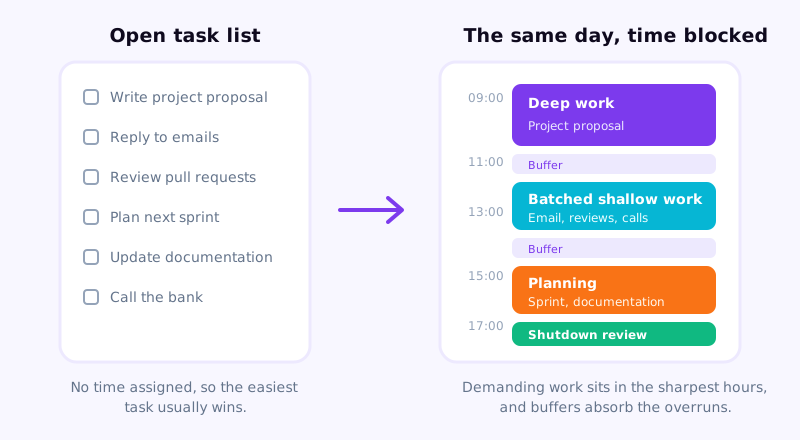
A to-do list tells you what to do but not when. Time blocking tells you both. With a list alone, tasks pile up and you react to whatever feels most pressing. Time blocking forces you to estimate how long things take, plan realistically, and protect time before your day fills with interruptions. It turns intentions into scheduled commitments.
What if your plans keep changing throughout the day?
Build buffer blocks into your schedule — 30-minute unassigned slots between major blocks. These absorb overruns and unexpected tasks without derailing your whole day. Also, do a quick end-of-day review to reschedule anything that didn't happen. Flexibility is part of the system, not a failure of it. Aim for a plan that guides rather than rigidly controls.
How do you time block when you have frequent interruptions?
Block a dedicated "interruption window" each day where you handle ad hoc requests, drop-in questions, and reactive tasks. Outside of that window, use visual or verbal signals to communicate focus time (status indicators, closed doors, headphones). Setting expectations with colleagues about response windows dramatically reduces the interruptions themselves.
Is digital or paper time blocking better?
Digital tools (Google Calendar, Notion, Reclaim.ai) are better if your schedule changes frequently, you need to share it with others, or you want automatic reminders. Paper planners and physical time-block sheets work well for people who think better with pen in hand and prefer a screen-free planning ritual. Many people use both: paper for morning planning, digital as the official calendar.